Click below to start Geogebra OSA in Version 5.0. Particular builds of GGB is used:
GGB builds generated by GitHub Actions are available as releases in this repository.
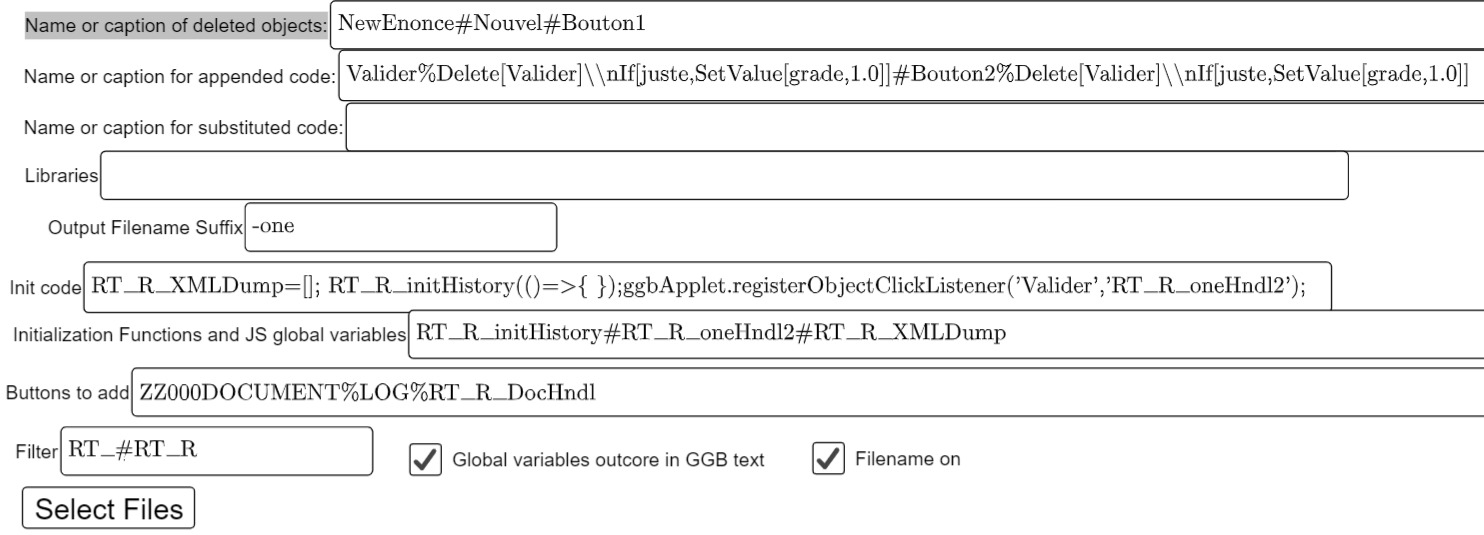
The OSA starts as a Geogebra page. To obtain a OSAed version of SomeName.ggb file one has to fill the input boxes and click the button "Select Files". Then a file picker comes up and you can select one or more files SomeName.ggb.
The service do his work and then prompts to download the OSAed ggbs that are the adapted versions of the input ggbs. The user can specify with "Output Filename Suffix" ONE suffix to be added to the output filenames. Here are the meanings of the input fields. When the situation requires more inputs they can be given as a ash (#) separated list. If the situation requires a list of lists you can put an hash separated list of percent (%) separated lists. For instance as in "Valider%Delete[Valider]#Bouton2%Delete[Bouton2]" where one finds the two couples Valider%Delete[Valider] and Bouton2%Delete[Bouton2]. Here is the list of input fields and their meaning:
In particular the choice in the example will give files SomeName-one.ggb decorated with an additional button LOG that you can use to output a html file (by function RT_R_DocHndl) with the snapshot taken with the function RT_R_oneHndl2 linked to the button Bouton2 in the initialization code.This snapshot the GGB exercise situation every time Bouton2 is pressed. The other code ensures that Bouton2 is deleted upon the first click. For completeness let's add that RT_R_oneHndl2 snapshot both Graphics and Graphics2 views while there is provision in the code for the function RT_R_oneHndl that just snapshots Graphics.
You can find an example of the resulting GGB activity here that is obtained by processing this example taken from this site.The translator tool works only in the Geogebra web version some problems might come from security limitations of the browser. You can circumvent it by running the Geogebra applet in Chrome with the option `--disable-site-isolation-trials --disable-web-security` e.g. in Windows
"C:\Program Files (x86)\Google\Chrome\Application\chrome.exe" --disable-site-isolation-trials --disable-web-security --user-data-dir="I:\temp"
For Chrome you might try also --disable-web-security --allow-no-sandbox-job --allow-sandbox-debugging --no-sandbox --no-sandbox-and-elevated --no-zygote --no-zygote-sandbox --run-without-sandbox-for-testing --disable-popup-blocking --user-data-dir="I:\temp" they could help.
The file index<somename>.html loads the GGB application and the GGB activity `valinonestep.ggb` into a GGB Applet that runs in a browser. Loading could be slow. While debugging you can re-initialize the translator from the GGB File menu by reloading the `valinonestep.ggb` file.
This project was developed and maintained using Eclipse and Egit. Not all the files have a clear meaning. The repository is undoubtedly messy. Nevertheless the repository contains all files generated by Eclipse. By forking this in GitHub and by cloning your fork directly from GitHub into Eclipse with a Egit clone operation you will get an Eclipse project to modify and develop this package on your own. If you feel that later on you can cooperate with us branch your project locally this will make your contribution later submit-able as a pull request. The `.launch` files you will find in this repo must be imported into Eclipse separately to get debug configurations.